NEXUS — Developer Portfolio
A free dark/light portfolio template for developers and IT professionals. Built with Next.js, TypeScript and Tailwind CSS, edited from one config file, with no backend and no tracking.
Product Information
Overview+
NEXUS — Developer Portfolio is a personal portfolio website template for software developers and IT professionals. It comes in a dark and a light theme. You change it from one configuration file and don't have to touch the components.
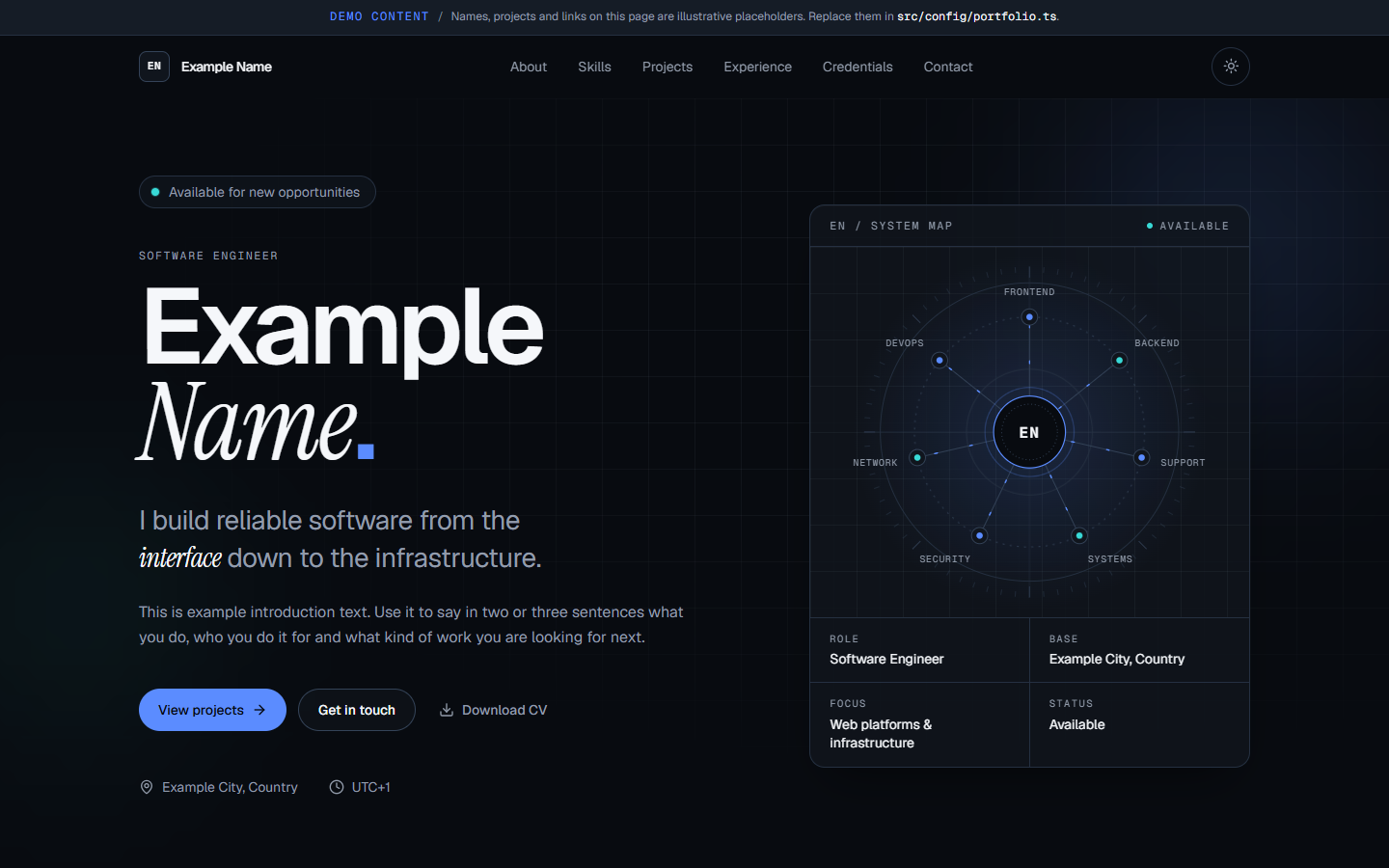
It is made for software and web developers, IT support specialists, system administrators, cybersecurity specialists, DevOps engineers, freelancers and technical consultants. You edit one typed file (src/config/portfolio.ts) and get a complete site: a hero with availability status, an about section, skills in seven disciplines, filterable projects with optional case-study pages, experience, education, certifications and contact.
The template ships with clearly labelled demo content ("Example Name", "Example Company", example.com) so it doesn't look empty after installation. A small notice says the content is illustrative, and one setting turns it off.
It needs no backend, database, accounts, API keys or paid services, and it has no tracking.
Features+
Sections
- Hero: name, title, headline, introduction, availability indicator, "View projects", "Get in touch" and "Download CV" buttons, plus an original generated "system map" visual built from your skills
- About: biography, statement, quick facts, career interests and a numbered "How I work" section
- Skills: seven ready-made categories (Frontend, Backend, IT Support, System Administration, Cybersecurity, Networking, DevOps & Infrastructure). Add or remove categories freely.
- Projects: automatic category filters, a featured layout, technology tags, GitHub and live-demo links, original artwork or your own screenshots, and optional case-study pages
- Experience timeline with responsibilities and achievements, and Education
- Certifications: obtained and in-progress items shown separately and clearly labelled
- Contact: email with a copy button, social links, and an optional form (opens the visitor's email app or posts to an endpoint you configure)
Design & interaction
- Premium dark theme plus a complete light theme. The toggle remembers the visitor's choice, and the site follows the OS preference until a choice is made.
- Editorial typography (Geist, Geist Mono, Instrument Serif), restrained ambient lighting and code-generated visuals
- Sticky header with an active-section indicator, accessible mobile menu, smooth scrolling, scroll-reveal animations and a back-to-top button
- All animations respect
prefers-reduced-motion - Responsive from 320 px to wide desktop screens
Quality
- Next.js 16 App Router, TypeScript, Tailwind CSS 4, Motion and Lucide icons
- Every page is generated statically. Deploy to Vercel, run on a Node.js server, or export a static site for any web host.
- SEO: metadata, canonical URLs, generated Open Graph images, sitemap, robots.txt, web manifest and schema.org Person data
- Automated accessibility audit (axe-core, WCAG 2.1 AA) with no violations in either theme
- No external requests, analytics, cookies or telemetry
Requirements & Dependencies+
Requirements
- Node.js 20.9.0 or newer (tested with 24.21.0)
- npm 9 or newer (tested with 11.19.0)
- An internet connection for the first
npm install - No API keys, accounts, database or paid services
Dependencies
Installed automatically by npm. License texts are included in the licenses/ folder.
- Next.js 16.4.6 (MIT)
- React and React DOM 19.3.1 (MIT)
- Motion 14.14.0 (MIT)
- Lucide React 1.81.0 (ISC)
- Tailwind CSS 4.3.5 (MIT)
- Geist fonts 1.9.2 (SIL OFL 1.1)
- Instrument Serif via Fontsource 5.3.0 (SIL OFL 1.1)
- Development tools: TypeScript 5.9.3 (Apache-2.0), ESLint 9.39.5 (MIT), eslint-config-next 16.4.6 (MIT)
The README lists every component with its license file, and also the packages npm installs on your machine that are not part of the delivered code.
What Files Do I Get?+
One ZIP (nexus-developer-portfolio-1.0.0.zip) with a single root folder nexus-developer-portfolio/ containing:
- Complete source code (
src/): pages, components, styles, and the configuration filesrc/config/portfolio.ts package.jsonandpackage-lock.json- Configuration files:
next.config.ts,tsconfig.json,eslint.config.mjs,postcss.config.mjs,.gitignore - Public assets: placeholder CV (PDF) and placeholder profile image (SVG)
scripts/flatten-export.mjs(helper for static hosting)README.md: full documentation, including a list of every file in the ZIPLICENSE.txtlicenses/: license texts of the third-party components
No node_modules, build output, .env files, secrets or executable files are included.
How To Install?+
- Install Node.js 20.9 or newer from nodejs.org.
- Unzip the archive and open a terminal in the
nexus-developer-portfoliofolder. - Run
npm cito install dependencies. - Run
npm run devand open http://localhost:3000. - Edit
src/config/portfolio.tswith your own details, replace the CV and profile image inpublic/, and setshowDemoNoticetofalse. - Build for production with
npm run buildandnpm run start, deploy to Vercel, or runnpm run build:staticand upload theout/folder to any web host.
Documentation+
The included README.md covers:
- Installation, local development and production builds
- Step-by-step customization of your name, branding, profile image, text, colors, projects, skills, experience, education, certifications, social links and CV
- Theme customization (all colors are CSS variables in
src/styles/theme.css) and fonts - Contact form modes and what an endpoint needs
- Deployment to Vercel, a self-hosted Node.js server and static web hosts
- Privacy and security notes
- Third-party components and their licenses
- What was tested, and what to check after customizing
Every configuration field is also described in src/config/types.ts, and editors show these descriptions on hover.
License Information+
Single Site
Important Details
- Demo content is illustrative. All names, companies, projects, certifications, links and the CV are placeholders, not real people or credentials. Replace them before publishing.
- Contact form: the default mode opens the visitor's email app, and the site itself does not send email. To receive messages directly, connect a form endpoint of your choice (see README). The form never shows "sent" unless a message actually went through.
- No hidden functionality: no analytics, tracking pixels, telemetry, cookies, license checks, or domain or IP locking. The only browser storage used is the saved theme preference.
- No brand logos: social links use generic icons. Add brand logos only if you have the right to use them.
- Images: the template contains no stock photography. Use images you own or have the right to publish.
- Tested on Windows 11 with Chromium-based Microsoft Edge (headless). Safari, Firefox and physical mobile devices were not tested; please check your customized site on the browsers your visitors use.
- Third-party components keep their own licenses, included in the
licenses/folder.